

Deep Research is a new function of Mapify to move from a broad question to work you can actually use: a cited research report you can defend and a synchronized, clarifying mind map you can execute with your team. It plans the approach, researches across multiple sources, cross-verifies what it finds, and delivers both outputs side by side inside Mapify.
View the live report example: AI in education
What Is Deep Research
Deep Research is a guided, multi-agent workflow. It clarifies your question when necessary, splits the work into focused tasks, and lets research agents search, fetch, and verify information in parallel. A writing agent then turns the findings into a readable report with numbered citations and a source list. Finally, a mapper generates an editable mind map that mirrors the report’s structure, so the path from “what we learned” to “what we’ll do” is built in.
In practice, you end up with two linked deliverables: a narrative you can share and defend, and a map that makes briefs, plans, and hand-offs effortless.
The Difference Between Ask Anything and Deep Research
You may have used the Ask Anything feature in Mapify, which supports turning your idea into mind maps automatically by simply chatting with AI. However, there are some differences between Deep Research and Ask Anything:
Ask Anything
- Purpose: quick answers & concise summaries
- Depth: light structure, minimal verification
- Best for: short questions, everyday notes, quick recaps
Deep Research
- Purpose: insights with citations you can defend
- Depth: multi-source collection, cross-verification, conflict notes, report + mind map
- Best for: market scans, competitor teardowns, policy/standard digests, mini literature reviews
Instantly turn your content into mind maps with AI
Get Started NowHow to Use Deep Research in Mapify
Before using, you should learn that AI Deep Research asks for credits, so it currently works for Mapify Pro and Unlimited users only (3-day free trial included).
Step 1: Launch Mapify Deep Research
Log in to your Mapify account and choose the Deep Research section from the sidebar.
Step 2: Select your mode
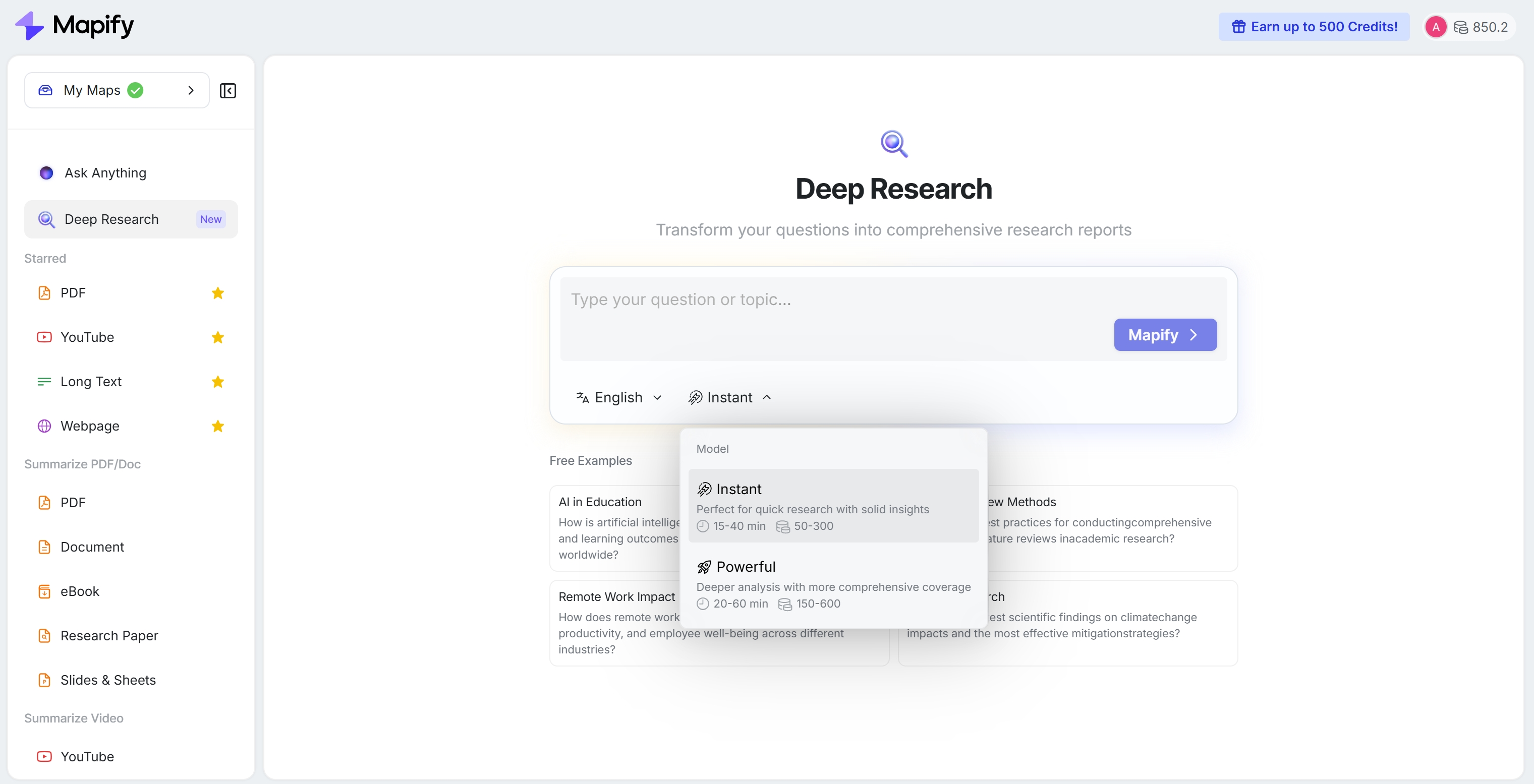
Ask your question and choose the output language and the working mode, and then click the Mapify button to continue.
- Instant – Perfect for quick research with solid insights, takes 15-40 mins, and 50-300 credits are required.
- Powerful – Deeper analysis with more comprehensive coverage, takes 20-60 mins, and 150-600 credits are required.
Step 3: Clarify your question
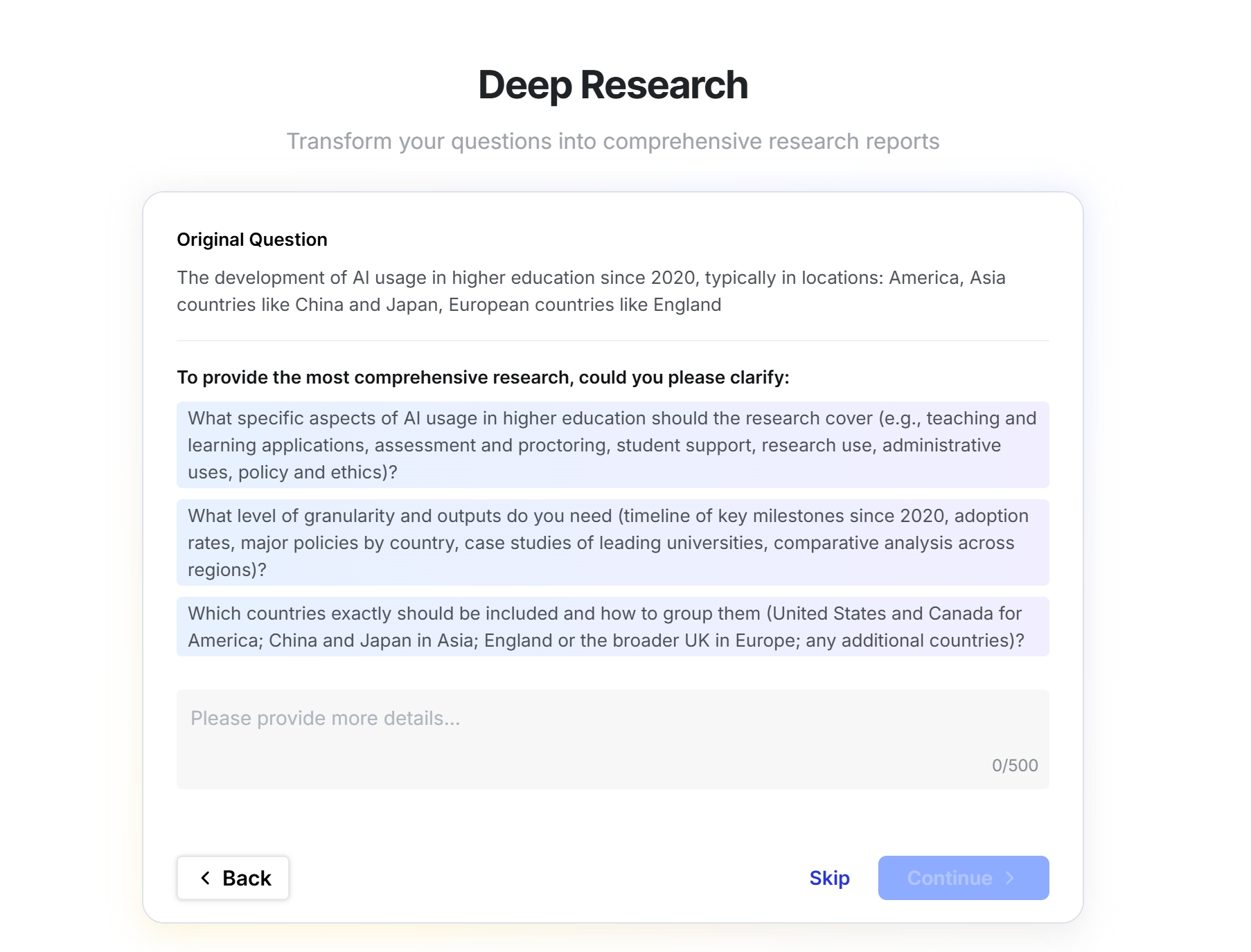
You’ll be asked to confirm the credits taken and provide more details to clarify the topic.
Step 4: Analyze & Generate
Click Continue or Skip to start analyzing and generating. You can see the working process and the sources it gathered.

Step 5: Preview & Refine
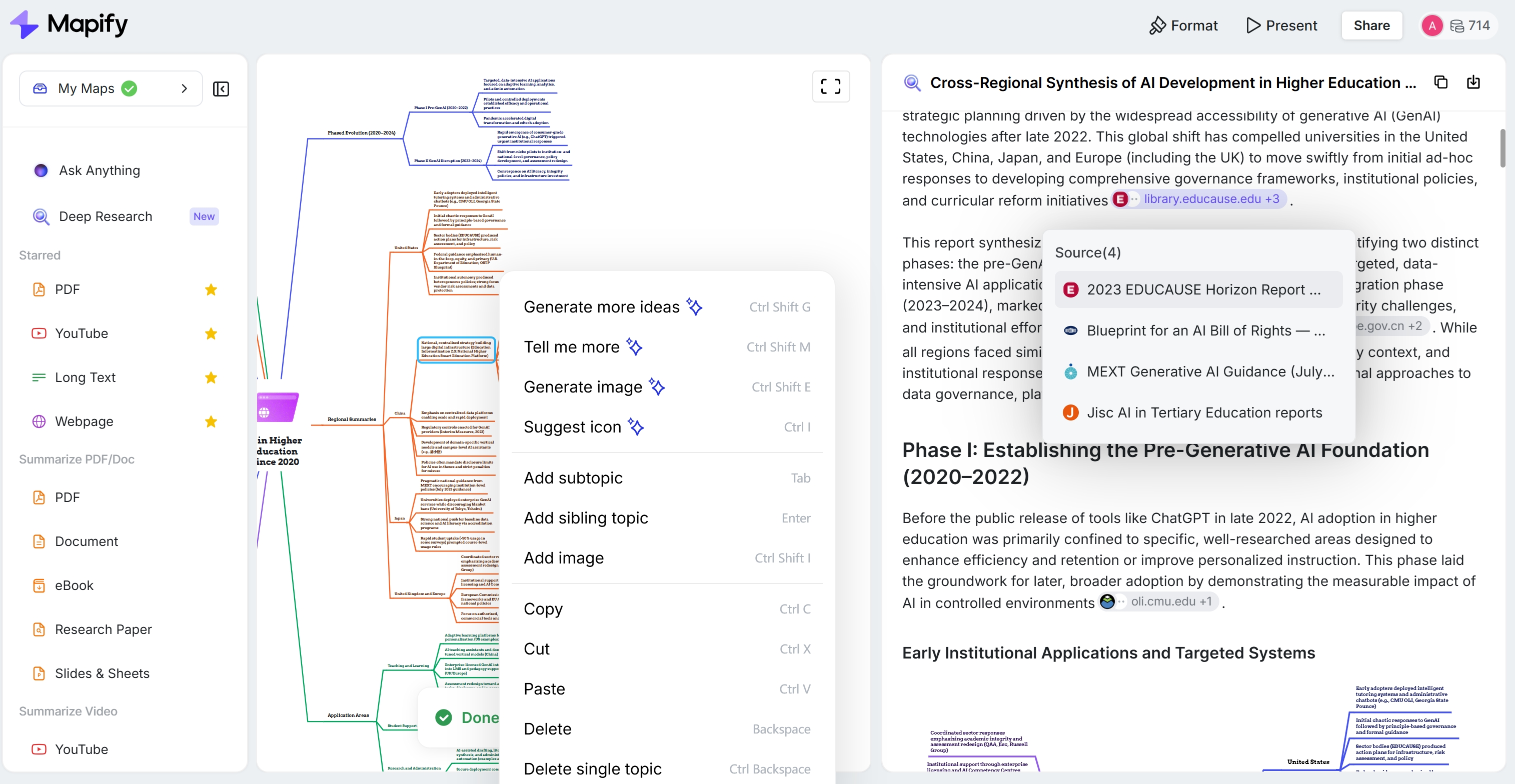
You can preview the generated cited report and synced mind map. Every chapter has a subtopic mind map to help you understand the structure. You can edit the report and mind map if you need.
Step 6: Export & Share
Copy the report directly or export it as PDF, images, and Markdown files for further use. You can also share it via a link.
Instantly turn your content into mind maps with AI
Get Started NowHow Mapify Deep Research Helps You (Use Cases)
- Go-to-market & growth: market sizing, competitor breakdowns, messaging/positioning research, campaign post-mortems
- Product & operations: feature comparisons, regulatory/policy digests (e.g., DMA/DSA), meeting → action plan
- Research & education: mini literature reviews, course/lecture synthesis, policy briefs
- Content & reviews: review mining → claim matrix, outline → script with sources
- Consulting & strategy: landscape scans, vendor evaluations, due-diligence summaries
Prompt starters:
- “Compare EU DSA vs DMA obligations for app marketplaces; highlight differences and recommended actions.”
- “Distill 500+ laptop reviews into key pros/cons and a decision tree, with citations.”
- “Summarize 12–15 papers on retrieval quality; map gaps and opportunities.”
Mapify Deep Research Ability
High-level view of how Mapify positions against popular “deep research” experiences.
| Tool | Primary Output | Verification | Actionability | Ecosystem Fit |
|---|---|---|---|---|
| Mapify Deep Research | Cited report + editable, synced mind map | Cross-verified, numbered citations | High — map mirrors report; easy hand-off to plans/outlines | Native to Mapify; maps & reports live together |
| ChatGPT “Deep Research” | Long, cited report | Cited sources | Medium — strong report; no native mind-map | ChatGPT workspace |
| Google NotebookLM “Deep Research” | Report + sources dropped into notebook | Linked sources; background browsing | Medium — great for Docs/Sheets workflows | Tight with Google ecosystem |
| Perplexity “Deep Research/Research” | Long-form answer with citations | Inline citations, rapid web coverage | Medium — fast, sourced overview | Shareable threads; export options |
What’s unique about Mapify: the paired deliverable. You don’t just read; you immediately plan from the same structure.
Instantly turn your content into mind maps with AI
Get Started NowFAQ
1) Is it free to use?
At launch, Deep Research is available for Pro & Unlimited plans (3 days free trial included). Free plan access isn’t promised.
2) How many credits does it take?
Credit use scales with question complexity. Typical ranges:
- Instant: ~50-300 credits (pre-hold 150)
- Powerful: ~150-600 credits (pre-hold 300)
Actual consumption depends on the number of searches and fetches, as well as the amount of synthesis required for your topic.
3) How long does a Deep Research run take?
Timing varies by scope and source availability. Expect minutes to tens of minutes. Generally, the Instant mode takes 15-40 mins while the powerful mode takes 20-60 mins. You’ll see visible progress (Planning → Researching → Creating) instead of a black-box wait.
4) Is it 100% accurate?
No research tool is. Deep Research shows citations for every claim and cross-checks across sources, but for high-stakes decisions, you should always open and review the linked pages.
5) What output formats are supported?
You can copy the report text directly or download it as a PDF file. And the generated mind map can be exported as PDF, images, Xmind, Markdown, and other formats. What's more, you can share your deep research report with others via a link.
Instantly turn your content into mind maps with AI
Get Started Now


.png)