


If you’ve ever opened a long PDF and felt immediately stuck—dense paragraphs, scattered sections, too many pages—you’re not alone. PDFs are designed to be complete, not necessarily easy to review. When your goal is simply to understand what matters, reading everything line by line is rarely the best use of time.
AI changes the workflow. Instead of starting with endless scrolling, you can start with a structured overview: key ideas, main sections, and how the concepts connect. Even better, when the summary becomes a mind map, you can scan the full document in seconds, zoom into details only when needed, and revisit the right section later without losing context.
In this post, you can learn how to use AI to summarize a PDF into an interactive mind map for better understanding, free and easy to use.
TL;DR (Quick Answer)
Upload your PDF → generate an AI summary → turn it into a mind map → refine with follow-up questions → export or share for study and collaboration.
What Is an AI PDF Summarizer
An AI PDF summarizer is a tool that reads a PDF and produces a shorter version focused on the main ideas. Depending on the tool, your output may look like a bullet list, an outline, or a visual map that groups sections and key points.
A good summarizer does more than shorten text. It helps you:
- Understand the structure of the document quickly
- Spot the most important points without losing context
- Pull out definitions, action items, and key takeaways for later use
Instantly turn your content into mind maps with AI
Get Started NowHow AI PDF Summarization Works
Most AI PDF summarizers follow a simple process:
- Extract the readable content from your PDF (the text layer and structure, when available).
- Clean the noise (headers, repeated footers, page breaks, irrelevant fragments).
- Identify the core ideas (topics, subtopics, key sentences, supporting points).
- Generate a summary format (short overview, outline, bullet points, or mind map).
- Let you refine by adjusting length, focus, language, or asking follow-up questions.
How to Summarize a PDF with AI Free Online
When a PDF feels too long to read comfortably, Mapify helps you turn it into a structured overview—often as a mind map—so you can understand the document faster and revisit key sections later.
With the powerful AI ability, Mapify helps you reorganize the PDF key points within seconds. Upload your file, and it summarizes the content into clear branches based on the document’s structure. Then you can refine the summary, expand specific parts, or ask questions to extract what you need.
Instantly turn your content into mind maps with AI
Get Started Now3 Steps to Summarize a PDF using Mapify
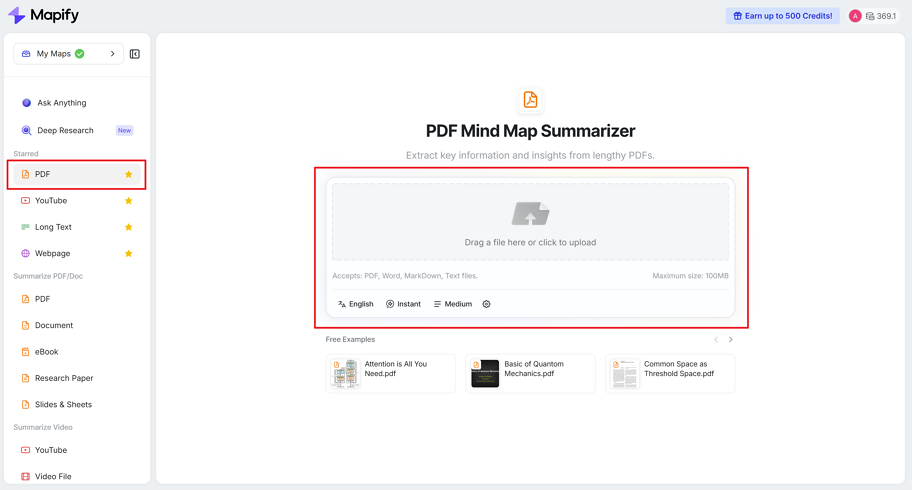
Step 1: Upload your PDF to Mapify
Log in to Mapify and choose the PDF option from the left panel. Upload your file by dragging and dropping it, or by selecting it from your device.
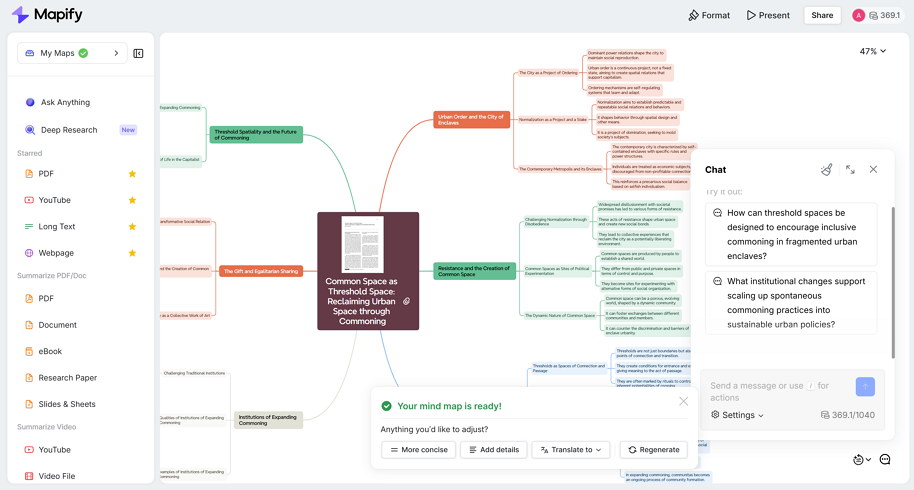
Step 2: Generate the summary and refine it
Mapify generates a structured summary (often as a mind map). You can refine it by:
- making it more concise or more detailed
- focusing on a specific angle (e.g., “exam key points” or “action items”)
- translating the output if needed
- regenerating parts of the map for clarity
You can also chat with AI inside the map to specify your needs.
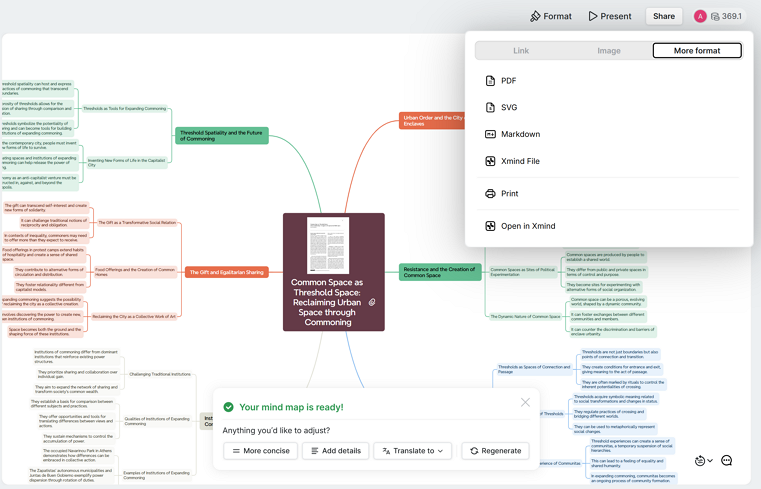
Step 3: Export or share your PDF summary
Once your map looks right, export it in your preferred format, such as PDF, image, Markdown, or XMind. You can also share it via a link.
Tips for Better PDF Summaries
Prompts You Can Copy
Use prompts like these to get more targeted results:
- For study notes: “Summarize this chapter into 8 bullet points and include key definitions.”
- For research papers: “Extract the methodology, main findings, and limitations. Keep it concise.”
- For action items: “List decisions, risks, and next steps as an action checklist.”
- For quick review: “Give me a 5-sentence overview and 10 key takeaways.”
- For exam prep: “Identify what is most likely to appear on an exam and explain it simply.”
Get More Accurate PDF Summaries
Small tweaks can improve results a lot:
- Use a clean file when possible (avoid screenshots of pages if you have the original PDF).
- If the PDF is long, summarize chapter by chapter for better focus.
- Ask for the exact output you want (outline, bullet list, mind map, or action items).
- If your PDF contains important numbers, double-check the original tables or ask the AI to quote the source section.
- When the layout is complex, prompt the tool to focus on headings and section summaries first.
Related Use Cases (If You’re Summarizing More Than PDFs)
If your workflow includes different content types, you may also want:
- A research paper summarizer for papers and citations
- A deep research report workflow for structured, referenced briefs
- A textbook summarizer for chapter-by-chapter study maps
- A slides summarizer for presentations and lecture materials
Instantly turn your content into mind maps with AI
Get Started NowFAQ
Can AI summarize scanned PDFs?
Yes, but scanned PDFs often require OCR first. If the text isn’t selectable, convert the scan into readable text before summarizing for the best results. Mapify supports OCR technology, so you can summarize the scanned PDFs using Mapify.
Can I summarize only one chapter or selected pages?
In most tools, yes. For better accuracy, summarizing one chapter or section at a time usually produces clearer results than summarizing an entire textbook-length file in one go. Mapify allows chapter-by-chapter summaries according to your needs.
Can AI extract quotes, definitions, or formulas from a PDF?
Yes. Ask for a “definitions list,” “key quotes,” or “formula summary,” and specify whether you want sources or page references included.
How do I summarize a research paper PDF more effectively?
Ask for specific components like “methodology,” “main findings,” “limitations,” and “implications.” This is usually more useful than a generic summary.
Is using a PDF summarizer considered cheating for studying?
It’s generally best used as a study aid—like notes or an outline. Use the summary to guide your review, then confirm key points in the original text.
Final Thoughts
Summarizing a PDF is no longer just about making it shorter—it’s about making it usable. A good AI workflow helps you surface the structure, focus on what matters, and revisit the right sections quickly without losing context.
Mapify stands out when you want more than a plain summary. Turning PDFs into visual mind maps, it helps you see how ideas connect, refine sections with follow-up questions, and export results in formats that fit study and collaboration. When you’re working with dense material, that structure can make the difference between rereading and actually understanding.
Instantly turn your content into mind maps with AI
Get Started Now


.png)