


Finals are brutal.
You’ve got weeks (or months) of lectures, slides, PDFs, random screenshots, and YouTube videos… and maybe five days to make sense of it all. You reread notes, highlight a few lines, watch lectures at 2x speed — and still feel like nothing is really sticking.
If that sounds familiar, this guide about final exam tips is for you.
Instead of trying to cram more content into your brain, you’re going to change how you organize it — using AI and mind maps. In this article, you’ll learn how to:
- Turn your messy notes, PDFs, and YouTube lectures into clear AI mind maps
- Build a structured revision plan for finals in a few hours, not days
- Use Mapify to generate mind maps from your course materials, then actually study with them
Why Finals Feel So Overwhelming (and Your Current Notes Don’t Help)
Most students don’t fail finals because they’re lazy. They fail because:
- There’s too much content: 10+ weeks of lectures in every course
- Everything is spread out: PDFs in your downloads, screenshots on your phone, notes across apps
- Revision is passive: rereading, highlighting, scrolling through slides
The result?
You see the information again, but you don’t build a mental structure for it. During the exam, you remember vague pieces (“I swear I’ve seen this slide before…”) but not how everything fits together.
What you really need is:
- A big-picture map of each course
- A way to see how topics connect
- A revision method that forces your brain to organize, not just reread
That’s where mind maps come in.
Why Mind Maps Work So Well for Exam Revision
A mind map is a visual way of structuring information: one central topic in the middle, with branches for subtopics and details.
For exam revision, mind maps help you:
- See the whole course on one page — chapters, topics, subtopics
- Understand relationships between concepts (great for theory-heavy subjects)
- Remember better, because you recall the shape and layout of the map
The problem?
Manually building mind maps from scratch takes ages. Redrawing slides, summarizing chapters, copying bullet points… when your exam is in three days, that’s not realistic.
That’s why using AI to generate the first version of your mind map is such a big win.
With a tool like Mapify, you can:
- Upload your lecture slides or notes → get a draft mind map
- Paste a YouTube lecture link → get transcript + summary + mind map
- Edit and customize the map instead of starting from a blank page
You spend your time thinking about the content, not manually rearranging boxes.
Instantly turn your content into mind maps with AI
Get Started NowMeet Mapify: AI Mind Maps for Students
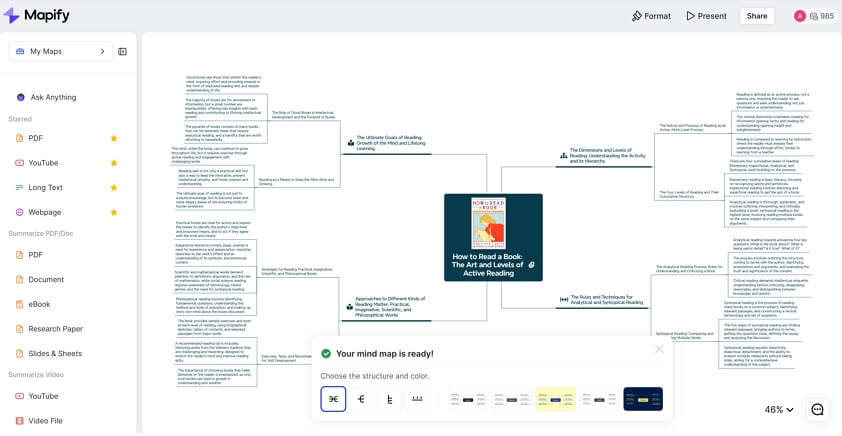
Mapify is an AI-powered tool that turns long-form content into mind maps and summaries.
For students, that means you can:
- Upload PDF lecture slides, notes, and textbook chapters
- Paste links to YouTube lectures or other videos with subtitles
- Let AI pull out the important ideas and organize them into a mind map
- Edit nodes, add your own notes, link related topics, and highlight what you need to memorize
You don’t have to be “good at design” or “creative” to make a useful mind map. You just give Mapify your content and let it do the rest for you.
Step-by-Step: Turn Finals Chaos into AI Mind Maps
Let’s turn this into a concrete workflow you can follow.
Step 1 – Pick One Course and Define What’s in Scope
Don’t try to fix your entire semester in one night.
- Pick one course that matters most right now
- Example: “Psychology 101 final exam”
- Gather everything for that course:
- Syllabus or exam review sheet
- Lecture slides (PDFs or PPT exported as PDF)
- Teacher’s handouts / notes
- Important YouTube lectures or recorded classes
Your goal for now is simple:
“I want one mind map that represents this whole exam.”
Step 2 – Turn Lecture Slides and PDFs into an AI Mind Map
- Open Mapify and upload your lecture slides or PDF notes.
- Ask Mapify to summarize and structure the content — for example:
- “Create a mind map of the key topics and subtopics for this course.”
- Let AI generate the first version of the map. Then:
- Check if each chapter is a main branch
- Check if important concepts / definitions / formulas are included under each branch
Now start tweaking:
- Rename vague nodes (“Slide 3”) into meaningful titles
- Delete duplicates or irrelevant details
- Add new nodes for anything you know your professor emphasized
Use colors or icons to mark nodes as:
- 🔴 “Must memorize”
- 🟡 “I don’t fully understand this yet”
- 🟢 “OK / low priority”
Step 3 – Convert YouTube Lectures into Notes and Maps
If your course uses recorded lectures or YouTube videos, this step is huge.
- Copy the YouTube lecture URL.
- In Mapify’s YouTube tool, paste the link.
- Let Mapify:
- Generate a transcript/subtitles
- Summarize the lecture
- Turn key ideas into a mind map
You can use this in two ways:
- One map per lecture
- Great for long, dense videos
- Merged “course map” from multiple lectures
- Combine mind maps for Lecture 1–10 into one big overview
While checking the map:
- Use the transcript search for terms you don’t understand
- Jump back to specific timestamps in the video
- Update nodes with your own notes or examples
Step 4 – Add Your Own Notes and Exam Hints
AI gives you a structured skeleton, but your brain learns best when you add your own thinking.
Go through each main branch and ask:
- What did the teacher repeat over and over?
- What did they say, like “this will be on the exam”?
- What types of questions showed up in past papers?
Then:
- Add nodes like “Typical exam question: …” under each main topic
- Insert short sample answers, formulas, or key arguments
- Connect related topics with links (e.g. “Chapter 3 concept is used again in Chapter 7”)
Now your mind map is no longer just “AI-generated notes” — it’s a personal exam cheat sheet (in your head).
Step 5 – Use the Mind Map as Your Daily Revision Guide
Here’s how to actually study with your maps:
- Choose one branch (one chapter/topic).
- Zoom in on that part of the map.
- Try to recall details before clicking/expanding sub-nodes. Ask yourself:
- “What are the three main theories here?”
- “What are the steps in this process?”
- After reviewing, close Mapify and try to redraw that part of the map on paper from memory.
- Compare with the original and mark missing pieces.
This mix of visual structure + active recall is much more effective than rereading slides for the 5th time.
Instantly turn your content into mind maps with AI
Get Started NowExample: 5-Day Final Exam Study Plan Using Mapify
Here’s a simple 5-day plan you can copy and adapt.
Day 1 – Build the Big Picture
- Pick 1–2 priority courses.
- For each:
- Upload slides / PDFs into Mapify.
- Generate a mind map.
- Clean the structure: fix chapter titles, remove noise, and add missing topics.
Goal:
By the end of Day 1, you have one map per course that covers the whole syllabus.
Day 2 – Deep Dive into Weak Topics
- Look at each course mind map and mark topics you barely remember.
- For those branches:
- Rewatch specific parts of lectures (using timestamps from the transcript).
- Read textbook sections or notes again.
- Update the map with clearer explanations and extra examples.
Goal:
Turn “I have no idea what this is” topics into “I kind of get this now.”
Day 3 – Past Papers + Mind Maps
- Grab past exam papers or sample questions.
- For each question:
- Find the related branch in your mind map.
- Add nodes like “Question: …” and “Answer outline: …”.
- Notice which branches appear the most in questions — those are high priority.
Goal:
Your map becomes an index of exam questions and answer patterns, not just a pretty diagram.
Day 4 – Active Recall Sessions
- Morning:
- Choose 2–3 branches per course.
- Review them, then hide/close the map.
- Afternoon/evening:
- Try to redraw those branches on paper from memory.
- Check against the original, fill gaps, and mark weak spots.
Goal:
Train your brain to recall without looking, like in the real exam.
Day 5 – Light Review & “Cheat-Sheet” Mode
- Collapse your maps so you only see top-level nodes and a few critical details.
- Do short 20–30 minute reviews per course.
- Focus on red/“must memorize” nodes and common exam questions.
Goal:
Go into the exam with a clear mental map of each subject, not a fog of disconnected slides.
Tips to Use AI Without Relying on It Blindly
AI is powerful, but it’s not magic. A few guidelines:
- Always compare AI maps with your official syllabus and review sheet. If something important is missing, add it.
- Don’t assume every AI-generated node is correct. Correct definitions, formulas, and examples as you study.
- Use AI to save time on structuring and summarizing, but use your own brain for understanding, remembering, and practicing.
Think of AI as:
“A very fast note-taking assistant, not your brain replacement.”
Common Mistakes Students Make with AI Study Tools
Mistake 1: Creating Maps You Never Revisit
If you generate a map once and never open it again, it’s useless.
- Fix:
- Use the mind map as your main revision hub.
- Add links, questions, and notes over time so it stays alive.
Mistake 2: Making Maps Too Detailed
A mind map with 1,000 tiny nodes is impossible to revise from.
- Fix:
- Keep maps 2–3 levels deep for most topics.
- If a topic is huge, split it into a separate map.
Mistake 3: Only Reading, Never Practicing
Mind maps help you understand, but exams still test whether you can use the knowledge.
- Fix:
- Always pair map review with past papers or practice questions.
- Add those questions directly into the map under each topic.
Final Checklist Before Your Exam
For each course, ask yourself:
- Do I have one mind map that covers all chapters in the syllabus?
- Are my weakest topics clearly marked?
- Have I added example questions and answer outlines to key branches?
- Have I done at least one active recall session (redrawing from memory)?
If you can redraw the main structure of your mind map on a blank page, you’re much more ready than you think.
Try Mapify for Your Next Finals
If you’re staring at a mountain of slides, PDFs, and YouTube links, you don’t need to suffer alone.
With Mapify, you can:
- Turn lecture slides and notes into AI-generated mind maps
- Convert YouTube lectures into transcripts, summaries, and visual overviews
- Edit and personalize maps so they match exactly what your exam will test
Create your first exam mind map in under a minute — paste a PDF or YouTube link into Mapify and let AI build the first draft for you, then make it your own.
Instantly turn your content into mind maps with AI
Get Started Now


.png)