
Final exam season usually means three things: too much content, too little time, and way too much caffeine.
The good news: you don’t need to be “naturally smart” to do well in finals. You need a system.
This guide walks you through that system:
- How to prepare for final exams step by step
- The most effective study techniques for finals (backed by learning science)
- How to use AI tools (including Mapify) to speed up note-taking and revision
- A sample 7-day study plan you can copy and adapt
Use it as your master checklist for finals week.
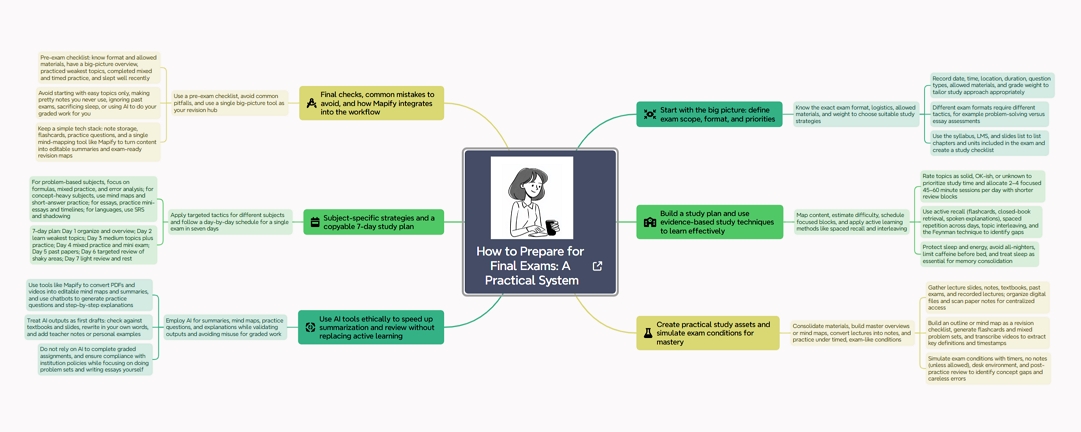
Share the final exam study tips mind map with your classmates – made by Mapify
1. How to Prepare for Final Exams: Start With the Big Picture
Before touching your notes, get clear on what you’re actually preparing for.
1.1 Know the exact exam format
For each course, write down:
✔️ Date, time, location
✔️ Duration (e.g. 90 minutes, 2 hours)
✔️ Type: multiple choice, problem-solving, essays, short answers, oral, open book, practical…
✔️ Weight: how much of the final grade it counts for
✔️ Allowed materials: formula sheet, calculator, dictionary, etc.
Different formats require different study strategies. A calculus problem exam ≠ a history essay exam.
1.2 Map the content and estimate difficulty
Go through the syllabus / LMS / slides list and:
List all chapters / units that are in the final.
Next to each, rate yourself:
✅ “Solid”
😐 “OK-ish”
❌ “No idea / never paid attention”
This gives you an honest study priority map:
❌ topics = high priority
😐 topics = medium
✅ topics = review only
1.3 Build a realistic study schedule
Take the number of days left and subtract:
- exam days themselves
- travel / work / mandatory events
- sleep (seriously)
Then, from what’s left, block:
- Daily core study blocks: 2–4 focused sessions of 45–60 minutes
- Review blocks: shorter 20–30 min sessions to recap old material
- Rest blocks: meals, exercise, short breaks
If you have 7 days until your first final, a simple split could be:
- Days 1–3 → learn / re-learn weak topics
- Days 4–5 → practice questions & past exams
- Days 6–7 → light review + sleep + stress management
Keep your schedule flexible, but write it down somewhere you’ll actually see: Google Calendar, Notion, paper planner, whatever you’ll check.
2. Final Exam Study Tips That Actually Work
There are thousands of “study hacks” online. Let’s focus on the ones that reliably help most students.
2.1 Use active recall, not passive rereading
Passive = rereading notes, highlighting, listening to lectures again. Active = forcing your brain to pull information out.
Simple active recall ideas:
- Close your notes and write everything you remember about a topic. Then check what you missed.
- Use flashcards (physical, Anki, Quizlet) and answer from memory.
- Look at a question and talk through the answer out loud.
Your brain learns by retrieving information, not just seeing it.
2.2 Space your practice (even over a few days)
Even if you only have a week:
- Don’t cram one topic for 5 hours straight.
- Instead, touch it briefly over multiple days.
Example:
- Monday: Learn / review Topic A for 60 min
- Wednesday: 20 min quick recap + 10 questions
- Saturday: 15 min final review
Short, repeated contact beats one huge cram session.
2.3 Mix topics (interleaving)
After you’ve learned the basics of each chapter:
- Stop studying “Topic 1” for an entire day and then “Topic 2” the next.
- Instead, mix them in practice sessions:
Example math set:
- 3 questions from chapter 1, 3 from chapter 2, 3 from chapter 5, 1 tricky one from the midterm.
This trains your brain to choose the right method, not just repeat the last thing you saw.
2.4 Teach the material to someone else (or fake it)
Explaining a concept forces you to organize it logically.
- Teach a friend / study group.
- Or use the Feynman technique: Imagine you’re explaining the topic to a 12-year-old. If you get stuck, you found a gap.
You can also “teach” to an empty room, your pet, or a voice memo app. It still works.
2.5 Protect your sleep and energy
Pulling all-nighters might feel productive but usually:
- kills memory consolidation
- slows down reasoning
- makes test anxiety worse
During finals week, treat sleep like an exam requirement:
- Aim for 7–8 hours, especially the night before the exam.
- Avoid heavy scrolling or bright screens in the last hour before bed.
- Caffeine: stop 6–8 hours before bedtime.
You can’t run a heavy exam on 1% battery.
3. Study Techniques for Finals: A Practical Workflow
Here’s a practical workflow you can apply to almost any course.
3.1 Step 1 – Consolidate all your materials
Collect, for each course:
- Lecture slides (PDF / PPT)
- Your notes (digital or paper)
- Textbook chapters / articles actually in the exam
- Past exams, problem sets, quizzes
- Important YouTube lectures or recorded classes
Put digital files into one folder per course. Take photos / scans of paper notes if needed.
3.2 Step 2 – Build a master overview of the course
Instead of drowning in details, start with the map, not the terrain.
Options:
- Create an outline: Course → Units → Subtopics → Key concepts
- Or create a mind map: Center = course name; branches = big topics; sub-branches = concepts, formulas, definitions.
This overview:
- Tells you what you don’t know yet
- Becomes your checklist for revision
Using AI to speed this up (with Mapify)
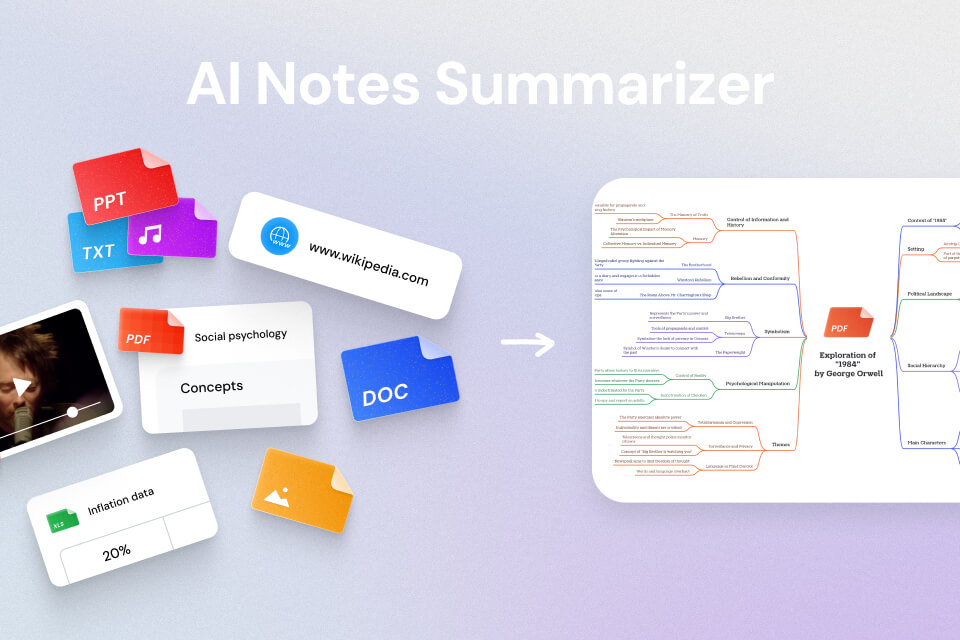
Manually summarizing slides is slow. You can use an AI tool like Mapify to:
- Upload lecture PDFs or notes
- Automatically extract key ideas
- Generate a mind map and summary you can edit
Mapify specializes in turning PDFs, documents, and even videos into mind maps, so you can go from “50 slides” to “one big picture” very quickly. Then you refine it with your own notes and teacher hints.
3.3 Step 3 – Turn long lectures & videos into notes
If you rely on YouTube or recorded lectures, use tools that transcribe and summarize them:
- Mapify’s YouTube summarizer (paste link → transcript + summary + mind map)
- Other options: video caption downloads, Otter.ai, etc.
From the transcript:
- Highlight definitions, examples, processes
- Add them into your overview / mind map
- Note timestamps for tricky parts so you can rewatch only those moments
This saves you from rewatching 2-hour videos just to find one concept.
3.4 Step 4 – Create active study assets
Turn the content into things you can actively practice with:
Flashcards
- Tools: Anki, Quizlet, physical index cards
- Good for: definitions, formulas, vocabulary, dates, theorems
Problem sets
- Collect practice questions from homework, past exams, textbooks
- Mix them into varied sets (interleaving)
Mind maps as quiz boards
- Use your Mapify map or hand-drawn map
- Hide parts and try to recall what’s under them
- Redraw branches from memory
The goal: your resources should ask something from you, not just show you text.
3.5 Step 5 – Practice under exam-like conditions
At least once per course, try to simulate parts of the exam:
- Set a timer matching the real exam section.
- Work without notes (unless it’s open book).
- Sit at a desk, not in bed. No phone.
Afterward:
- Mark which questions felt slow or confusing.
- Add those topics back into your study plan.
- Note any careless errors (rushing, misreading, ignoring units).
This helps you adapt not just intellectually, but emotionally, to exam pressure.
Instantly turn your content into mind maps with AI
Get Started Now4. Using AI Tools to Study for Finals (Without Cheating)
AI can save you a lot of time if you use it correctly and ethically.
4.1 What AI is good at
AI tools can help you:
- Summarize long PDFs or textbook chapters
- Explain concepts in simpler language
- Generate practice questions and self-tests
- Turn raw content into structured notes or mind maps (Mapify)
- Translate or clarify terms in another language
Examples of AI tools you might use:
- Mapify – turns PDFs, documents, ebooks and YouTube videos into mind maps and summaries
- ChatGPT / other AI chatbots – explain concepts, generate practice questions
- Perplexity / AI search – quick overviews of topics + sources
- Notion AI, Microsoft Copilot, etc. – summarize notes in your existing apps
4.2 How to use AI safely and effectively
Some safe patterns:
Ask for explanations, not finished assignments:
- “Explain this formula step by step.”
- “Give me 5 practice questions about X with answers.”
Use AI output as a first draft, then:
- Check against your textbook / slides
- correct any mistakes
- Rewrite in your own words
When using Mapify:
- Upload your course materials
- Read through the generated mind map carefully
- Add teacher comments, past exam hints, personal examples
Important: follow your school’s rules on AI. Many allow AI for studying and explaining, but not for writing graded essays or projects.
4.3 What AI should not replace
AI should not replace:
- Actually doing problem sets yourself
- Writing your own essays and arguments
- Memorizing key formulas, definitions, vocabulary
- Checking your understanding with no help (closed-book practice)
Use AI as a super-fast assistant, not as a brain replacement.
5. Subject-Specific Final Exam Tips
Different subjects reward different strategies.
5.1 Math, physics, engineering (problem-based exams)
Focus on:
- understanding core concepts and formulas
- recognizing which method applies to which type of problem
Study tips:
- Build a formula sheet grouped by topic (even if the exam doesn’t allow one – it’s a great study tool).
- Do lots of mixed practice sets instead of repeating the same type of exercise.
For each error, ask:
- “Was this a concept issue, a setup issue, or a careless mistake?” and fix accordingly.
5.2 Biology, psychology, social sciences (concept-heavy exams)
Focus on:
- definitions, processes, comparisons between theories
Study tips:
- Use mind maps to link theories, researchers, and key concepts.
- Turn diagrams into step-by-step explanations in your own words.
- Practice short-answer questions: “Compare X and Y”, “Explain how Z works in 3 steps”.
5.3 History, literature, essay exams
Focus on:
- argument structure, themes, cause-and-effect, chronology
Study tips:
- Create timeline maps and character/theme maps for literature.
- Practice writing mini-essays (even just introductions & outlines).
- Memorize a few key quotes / examples you can reuse flexibly.
5.4 Language exams (vocabulary, grammar, reading)
Focus on:
- high-frequency vocabulary, common grammar patterns, reading speed
Study tips:
- Use flashcards or spaced-repetition apps daily.
- Read short texts and summarize them in your own words.
- Practice listening with transcripts (YouTube, podcasts, Mapify transcripts) and shadowing phrases.
Instantly turn your content into mind maps with AI
Get Started Now6. A 7-Day Final Exam Study Plan You Can Steal
Here’s a sample plan for one big exam in 7 days. Adjust times to your reality.
Day 1 – Organize & overview
- Gather all materials.
- Use Mapify or your own notes to build a master overview / mind map.
- Mark topics as ✅ / 😐 / ❌.
- Plan your study blocks for the week.
Day 2 – Learn / review weakest topics
- Spend 2–3 focused blocks on ❌ topics.
- Use textbook + AI explanations if needed.
- Create flashcards for new concepts.
- Add key points to your overview / mind maps.
Day 3 – Medium topics + first practice
- Work on 😐 topics.
- After each, do a small set of practice questions.
- Keep adding to your formula sheet / summary pages.
Day 4 – Mixed practice day
- Create mixed sets of questions from different topics.
- Simulate 1 mini exam section with a timer.
- Note weak areas and update your plan.
Day 5 – Past paper focus
- Do at least one full past exam or long practice set.
- Review answers carefully: mark concept gaps & collect “favorite questions” to review later
Day 6 – Targeted review
- Revisit only what still feels shaky.
- Use your mind map / overview to check off topics you’re confident in.
- Keep sessions shorter; don’t burn out.
Day 7 – Light review & rest
- Quick 20–30 minute reviews of key formulas / concepts.
- Briefly browse your Mapify map / notes to refresh the big picture.
- No heavy new learning.
- Sleep, hydrate, organize exam materials.
7. Common Mistakes to Avoid When Studying for Finals
Try not to:
❌ Start with the easiest chapters just because they feel good
❌ Spend hours making “pretty” notes you never revisit
❌ Rely only on watching videos or reading slides
❌ Ignore past exam questions until the night before
❌ Sacrifice all sleep for a few extra hours of low-quality study
❌ Use AI to complete graded work instead of understanding it
Your goal is not “studied 10 hours”, it’s “can answer the kinds of questions that will be on the exam”.
8. Quick Final Exam Preparation Checklist
Before each exam, check:
✅ I know the exam format and allowed materials
✅ I have a big-picture overview (outline or mind map) of the course
✅ I’ve identified and worked on my weakest topics
✅ I’ve done at least one set of mixed practice questions
✅ I’ve practiced under timed conditions at least once
✅ I slept reasonably well the last two nights
✅ I know what I’ll do in the first 5 minutes of the exam (scan the paper, plan time, etc.)
✅ If you can tick most of these, you’re more ready than you think.
9. Where Mapify Fits Into Your Final Exam Toolkit
You don’t need a thousand apps to prepare for finals. A simple stack is enough:
- A place to store notes (Notion, OneNote, Google Docs…)
- A flashcard system (Anki, Quizlet, paper)
- Practice questions / past exams
- One good “big-picture” tool – this is where Mapify can help
What Mapify can do for your final exam:
- Turn PDFs, lecture slides, and ebooks into clean summaries and mind maps
- Paste YouTube lecture links to get transcripts + structured overviews
- Edit and customize mind maps with your own notes and exam hints
- Use those maps as your main revision hub for each course
If your finals feel like a mess of scattered content, start by giving yourself a map.
👉 Try creating an exam mind map with Mapify today. Upload your most important PDF or YouTube lecture, let the AI build the first draft, then turn it into the study guide that carries you through finals week.
Instantly turn your content into mind maps with AI
Get Started Now


.png)