
Word documents are part of everyday work and study. Research papers, business reports, contracts, meeting minutes, internal proposals. We open them constantly, and many of them are longer than we expect.
The problem is not access. It’s time. Long documents are often dense, full of details, and structured in ways that make it hard to see what matters immediately. You scroll through pages, skim paragraphs, and still wonder whether you’ve fully grasped the core message.
That’s where an AI Word document summarizer becomes useful. Instead of reading everything line by line, you can generate a structured summary that highlights key sections, core arguments, and essential takeaways in minutes.
In this guide, you’ll learn how to summarize a .doc or .docx file step by step, along with practical tips to get better results.
What Is a DOC / Word Document Summarizer?
A DOC or Word document summarizer is a tool that allows you to upload a .doc or .docx file and automatically generate a summary.
Rather than manually copying and condensing text, the system analyzes the document’s structure, headings, and content to extract the most important information.
Common output formats include:
- A short overview paragraph
- Bullet-point summaries
- Structured outlines by section
- Mind maps for visual understanding
- Q&A mode to explore specific parts
The key difference from traditional manual summarizing is speed and structure. Instead of rereading and rewriting, you get an organized draft instantly. You can then refine it based on your needs rather than starting from scratch.
Why Summarize Word Documents?
Academic Study
Students often deal with long research papers or textbooks in Word format. A summary helps identify core theories, definitions, and conclusions before deeper reading.
Business Reports
Quarterly reports and internal documents can be lengthy. Summaries allow managers and stakeholders to grasp key insights quickly.
Legal Contracts
Contracts are usually detailed and formal. A structured summary highlights obligations, timelines, and critical clauses before a full review.
Meeting Minutes
Meeting notes can stretch across multiple pages. Summaries make it easier to extract decisions, action items, and next steps.
Content Repurposing
If you’re turning a document into a blog post, presentation, or email, a summary helps you identify the main points worth reusing.
Step-by-Step: How to Summarize a DOC File with AI
Mapify is one of the best AI document summarizers that can instantly summarize files like .doc, .docx, .csv, .xlsx, and PDF into mind maps. It helps you understand the document content quickly and structurally, and you can quickly catch the key points. You can edit the mind map manually or by chatting with AI, and export it into a PDF or share it via a link.
Besides documents, Mapify also supports other content like videos, audio, images, YouTube links, text, etc. Deep Research can also be done quickly with cited sources and a mind map report, just start from a simple question. You can even use the Mapify browser extension to summarize long emails.
Follow the steps below to summarize a DOC file with Mapify. It's simple, and you can try other files similarly.
Instantly turn your content into mind maps with AI
Get Started NowStep 1: Upload the .doc or .docx file
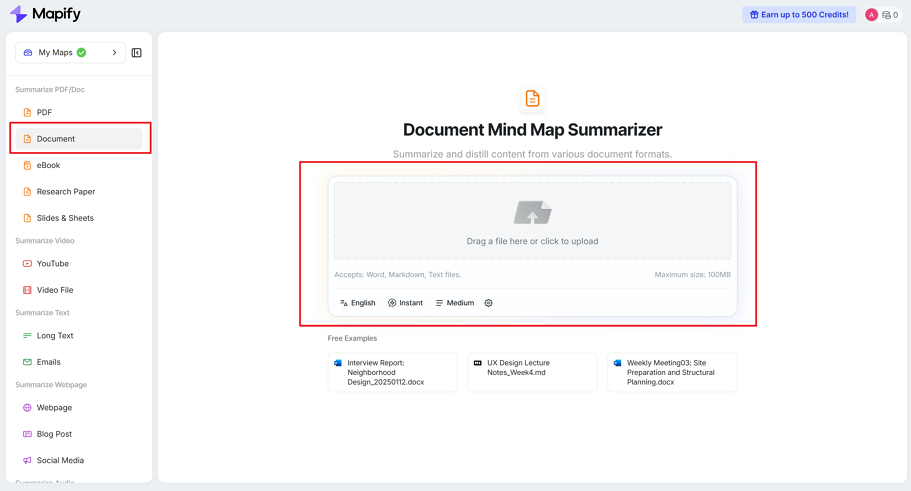
Log in to Mapify and upload your .doc or .docx file directly. The system supports multiple languages, so documents in English, Spanish, Japanese, or other major languages can be processed. Once uploaded, the tool analyzes the file’s structure, including headings and sections.
Step 2: Generate a structured summary
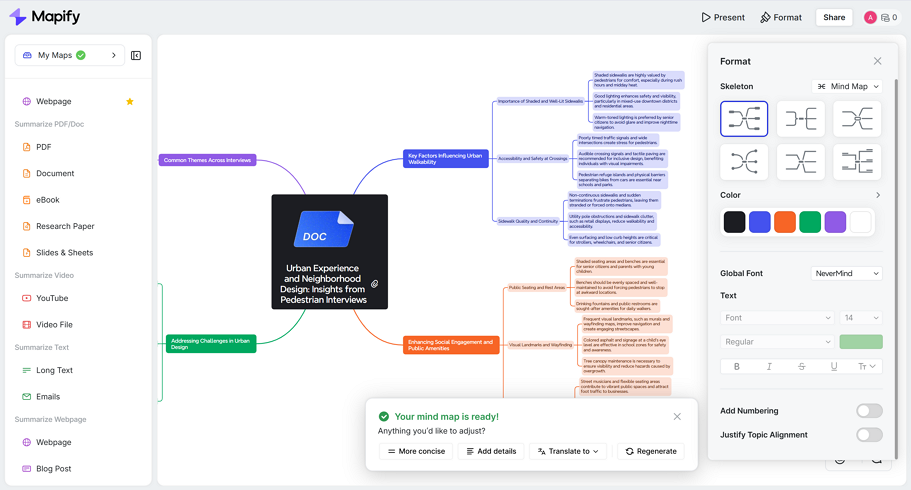
After processing, Mapify creates a structured mind map summary automatically. It can identify chapter or section structure and extract key concepts. This makes it easier to understand how different parts of the document connect.
You can refine the output by asking follow-up questions about specific sections, changing the length from a short overview to a detailed summary, or focusing only on selected sections or chapters. This step is especially useful for long academic or technical documents.
Step 3: Export or share
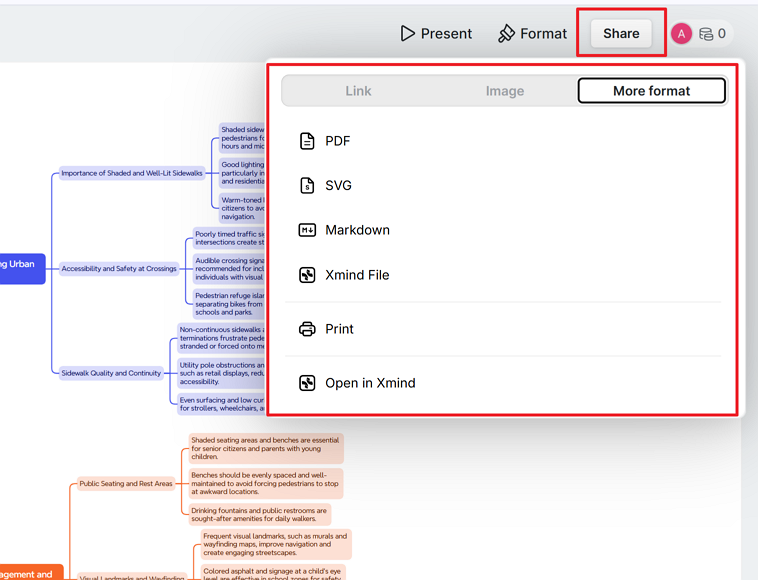
Once you’re satisfied, click on the Share button to export the summary as a PDF, Markdown, image, or share with others via a link. This allows you to reuse the summary in presentations, study materials, or team collaboration.
Tips for Better DOC Summaries
Use well-structured documents Files with clear headings and logical sections produce better summaries.
Define your goal first Decide whether you need a quick overview or a deeper analytical summary before generating the output.
Split very long documents For extremely long files, summarizing chapter by chapter often gives clearer results.
Review terminology carefully For technical or legal documents, double-check important terms to ensure accuracy.
Instantly turn your content into mind maps with AI
Get Started NowFAQ
Can AI summarize long Word documents?
Yes. Mapify can handle long documents, though very large files (maximum 100MB) may work better when summarized in sections.
Which kinds of documents can I upload for a summary?
Mapify currently supports not only DOC/DOCX files, but also PDFs, Excel files, Markdown files, eBook (EPUB), TXT, and more.
Does it work for scanned DOC files?
If the document is image-based, OCR support is required. Text-based Word files work best. Mapify has built-in OCR technology.
Can I summarize only selected pages?
Yes. You can focus on specific sections rather than the entire file, just chat with Mapify AI and tell it your needs.
Does Mapify support multilingual Word documents?
Yes. Mapify supports multiple languages, so you can summarize Word documents written in English, Spanish, Japanese, and other major languages. You can also translate the summary into another language if needed.
Is Mapify suitable for business and legal Word documents?
Yes. Mapify works well for reports, contracts, meeting minutes, and internal documents. However, for sensitive legal content, it’s always recommended to review important clauses manually after generating the summary.
Conclusion
Summarizing Word documents with AI is no longer just about saving time. It’s about understanding content more efficiently. Instead of getting lost in long paragraphs, you start with a structured overview that helps you decide where to focus.
Structured outputs such as outlines and mind maps make it easier to see connections between ideas, especially in academic, business, or legal documents.
If you regularly work with long .doc or .docx files, tools like Mapify offer a practical way to move from raw text to clear insights without the manual effort.
Instantly turn your content into mind maps with AI
Get Started Now


.png)