

Word documents are still one of the most common formats used in business, education, and legal work. Reports, research papers, contracts, meeting minutes, proposals. The problem is not access to information. It’s how long it takes to understand it.
When a DOC file runs dozens of pages, manually scanning for key points becomes inefficient. That’s why many users now rely on AI tools to summarize DOC files automatically. Instead of reading everything line by line, you can extract structured insights in minutes.
In this guide, we compare the top 6 DOC file AI summarizers in 2026, looking at features, strengths, limitations, and best use cases.
What Is a DOC File AI Summarizer?
A DOC file AI summarizer is a tool that analyzes .doc or .docx documents and generates a structured summary. Instead of focusing on individual paragraphs, it detects sections, headings, and key concepts.
Depending on the platform, the output may include:
- Short executive summaries
- Bullet point highlights
- Structured outlines
- Visual mind maps
- Question-and-answer exploration
The goal is not to replace reading entirely, but to reduce time spent identifying what matters most.
Instantly turn your content into mind maps with AI
Get Started NowTop 6 DOC File AI Summarizers
1. Mapify (Visual & Structured Summaries)
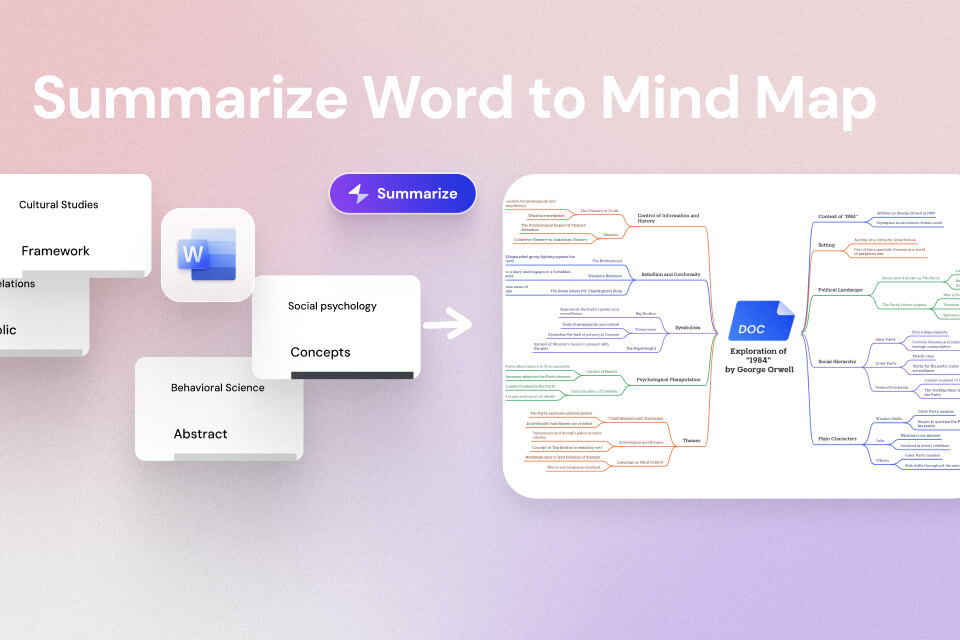
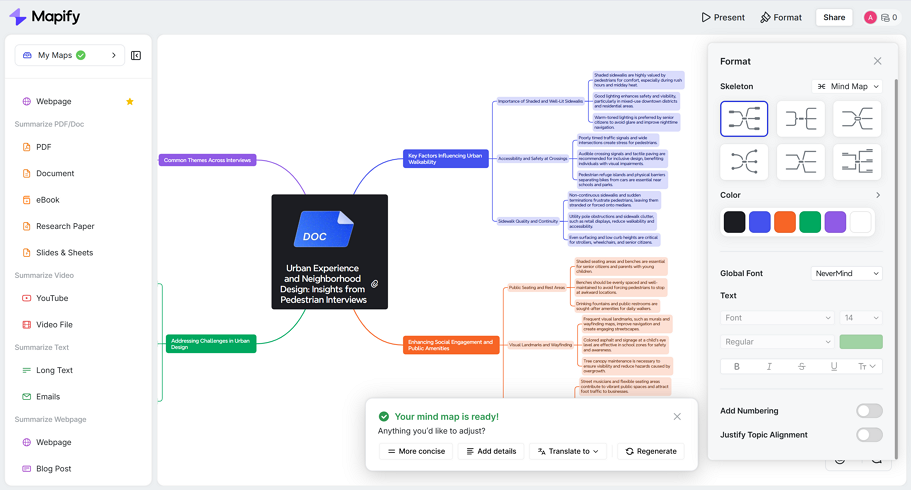
Mapify stands out because it does not just produce text summaries. Instead, it converts DOC and DOCX files into structured mind maps. After uploading a Word document, the system detects headings, sections, and core themes, then organizes them visually into branches and subtopics. This makes it easier to see how different ideas connect rather than reading a block of condensed text.
Beyond Word documents, Mapify supports PDFs, Excel files, slides, YouTube links, audio, and even Deep Research reports with cited sources. Users can refine the summary by chatting with the system, asking follow-up questions, adjusting the length, or focusing on specific sections. The summary can then be exported as a PDF, Markdown file, image, or shared via link.
Instantly turn your content into mind maps with AI
Get Started NowPros
- Clear mind map visual structure
- Easy to explain insights to others
- Works across multiple file types
- Good for non-technical users
Cons
- More focused on structured understanding than detailed narrative rewriting
Best for: Visual learners, students, consultants, and teams who need to understand and communicate document structure quickly.
2. Microsoft Word Copilot (Enterprise-Level Integration)
Microsoft Word Copilot is built directly into Microsoft 365 and allows users to summarize DOC files within Word itself. Instead of exporting content to another platform, you can ask Copilot to generate a summary, explain a section, or highlight key insights. It works especially well with business documents that include complex formatting, tables, or financial data.
Because it is integrated with Excel, Outlook, and PowerPoint, Copilot is particularly useful in enterprise environments. Users can move from a Word report to a summarized slide deck quickly. However, access requires a Copilot-enabled Microsoft 365 subscription, and it is primarily text-based rather than visual.
Pros
- Native integration with Word
- Strong for corporate and financial documents
- Handles structured enterprise reports well
Cons
- Requires a paid enterprise plan
- Limited visual output
Best for: Business professionals and organizations already using Microsoft 365 extensively.
3. Google Docs (Explore & Built-in AI Features)
Google Docs includes built-in smart features that help users summarize content directly within the document interface. The Explore feature and AI assistance can suggest key points, generate quick overviews, and help identify central themes. Since it runs inside Google Docs, there is no need to upload files to a third-party tool.
While the summaries are generally brief and high-level, they are useful for quick checks. For users already collaborating in Google Workspace, this can be the fastest way to get a short document overview without changing platforms. However, it may lack depth for long academic or technical files.
Pros
- No additional software needed
- Free within Google Workspace
- Simple and fast for short summaries
Cons
- Limited depth and customization
- Basic output structure
Best for: Quick in-app summaries and collaborative documents inside Google Workspace.
4. ChatGPT (Flexible & Conversational Summaries)
ChatGPT can summarize DOC files by uploading the document or pasting the content into the interface. Its strength lies in flexibility. You can ask for different summary styles, request a detailed breakdown, generate executive summaries, or ask targeted questions about specific sections.
This makes ChatGPT ideal for users who want customized explanations rather than a fixed summary format. However, the output is primarily text-based. It does not automatically provide structured mind maps or advanced visual layouts. The quality also depends on how clearly you define your request.
Pros
- Highly flexible summary styles
- Good for follow-up questions
- Strong for conceptual explanations
Cons
- No automatic visual structure
- Requires clear prompting
Best for: Users who want interactive, conversational summaries with tailored output.
5. Notion AI (Workflow-Integrated Summaries)
Notion AI is built into the Notion workspace and helps summarize DOC content that is pasted or uploaded into the platform. It works well for turning long reports into clean notes, bullet summaries, and action items. Because Notion combines notes, task management, and databases, the summarized content can immediately be converted into tasks or project plans.
The tool is particularly useful for content creators, startup teams, and students who already manage their work in Notion. However, it is less specialized for handling very large or highly formatted Word documents compared to dedicated summarizers.
Pros
- Integrated into productivity workflows
- Great for turning summaries into tasks
- Clean and simple interface
Cons
- Not specialized for complex formatting
- Less powerful for long academic documents
Best for: Notion users who want document summaries integrated with project management.
6. Sonix (Text-Focused & Multilingual)
Sonix is widely known for transcription, but it also supports document analysis and summarization. It works well for text-heavy DOC files and multilingual content. If you frequently deal with documents in different languages, Sonix offers solid support for translation and structured summaries.
Its summaries are primarily text-based and geared toward clarity rather than visual structure. This makes it suitable for research environments, journalism, or teams that need clean written outputs. However, it is a paid platform, and advanced features may require subscription tiers.
Pros
- Strong multilingual support
- Good for text-heavy analysis
- Professional-grade outputs
Cons
- Primarily text summaries
- Paid subscription required
Best for: Researchers, journalists, and multilingual teams.
Comparison Table Among AI Document Summarizers
| Tool | Output Style | Strength | Best For |
|---|---|---|---|
| Mapify | Visual mind map + structured summary | Clear structure & communication | Visual understanding |
| Word Copilot | Text summary + Q&A | Enterprise integration | Business users |
| Google Docs | Basic overview | Fast in-app use | Quick checks |
| ChatGPT | Custom text summaries | Flexible & conversational | Detailed explanation |
| Notion AI | Notes & task-oriented summary | Workflow integration | Productivity users |
| Sonix | Text-based structured summary | Multilingual support | Research & journalism |
Instantly turn your content into mind maps with AI
Get Started NowFAQ: DOC File AI Summarizers
Can AI summarize long DOC files accurately?
Yes, especially when documents are well-structured with clear headings. Very long documents may benefit from section-by-section summarization.
Is it safe to upload Word documents?
Most reputable platforms use encrypted processing. Always review the tool’s privacy policy before uploading sensitive contracts or legal files.
Can AI summarizers handle scanned DOC files?
If the file is image-based, OCR support is required. Text-based DOC files generally produce more accurate summaries.
Which summarizer is best for business use?
Microsoft Word Copilot is strong for enterprise users, while Mapify is useful when you need to explain structured insights visually.
Can I summarize only specific sections?
Yes. Most AI tools allow section-level summarization or targeted questioning.
Conclusion
Choosing the best DOC file AI summarizer depends on what you need. Some users want quick text overviews. Others need deeper analysis or a visual structure.
If your goal is structured understanding and easy communication, Mapify offers a strong visual approach. If you work inside Microsoft 365, Word Copilot may be the most seamless solution. For flexible custom summaries, ChatGPT remains a powerful option.
AI summarization is no longer just about saving time. It’s about understanding documents faster and making better decisions with less friction.
Instantly turn your content into mind maps with AI
Get Started Now



.png)