


Meeting transcripts are full of useful information, but they are rarely easy to review. A single meeting can include updates, decisions, repeated points, side discussions, open questions, and follow-up tasks all mixed together. Even when you have a full transcript, finding the most important takeaways later can still take a lot of time.
That is why more teams are now using AI to summarize meeting transcripts.
Instead of reading every line manually, AI can help identify the main discussion topics, pull out decisions, highlight action items, and organize the conversation into a format that is much easier to review. This makes it faster to understand what happened in the meeting and easier to share outcomes with the rest of the team.
What Is an AI Meeting Transcript Summarizer?
Similar to a YouTube transcript tool, an AI meeting transcript summarizer turns a raw meeting transcript into a shorter, clearer, and more structured summary. Instead of leaving you with pages of conversation, it helps surface what matters most, such as:
- key discussion points
- decisions made
- action items
- follow-up tasks
- unresolved questions
Some AI tools only generate a short text recap. Others go further by organizing the transcript into notes, outlines, or visual summaries. This is especially useful when a meeting covers multiple topics and you want a clearer way to understand the flow of the discussion.
Instantly turn your content into mind maps with AI
Get Started NowWhy Summarize Meeting Transcripts with AI?
Raw transcripts are valuable, but they are often too long and too messy to be useful on their own. They usually contain filler words, repeated ideas, off-topic comments, and half-finished thoughts, which makes it harder to quickly find what really matters.
Using AI to summarize meeting transcripts can help teams:
- save time after meetings
- review discussions faster
- capture decisions more clearly
- identify action items more easily
- share outcomes with people who missed the meeting
- turn conversations into reusable knowledge
This is especially helpful for remote teams, project managers, consultants, researchers, and anyone who deals with frequent calls or long discussions.
How to Summarize Meeting Transcripts with AI
Mapify is an AI-powered visual summarization tool that helps turn long, messy content into clear mind maps. Instead of giving you only a block of text, Mapify organizes information into structured, visual summaries that are easier to review, edit, and share.
For meeting transcripts, Mapify can help you quickly identify the main discussion topics, key decisions, action items, and follow-up questions, then turn them into a visual map your team can understand at a glance. It accepts videos, audio files, images, documents, even a podcast link. You can also chat with Mapify to understand multiple files and generate a summary for you.
Instantly turn your content into mind maps with AI
Get Started Now3 steps to summarize meeting transcript
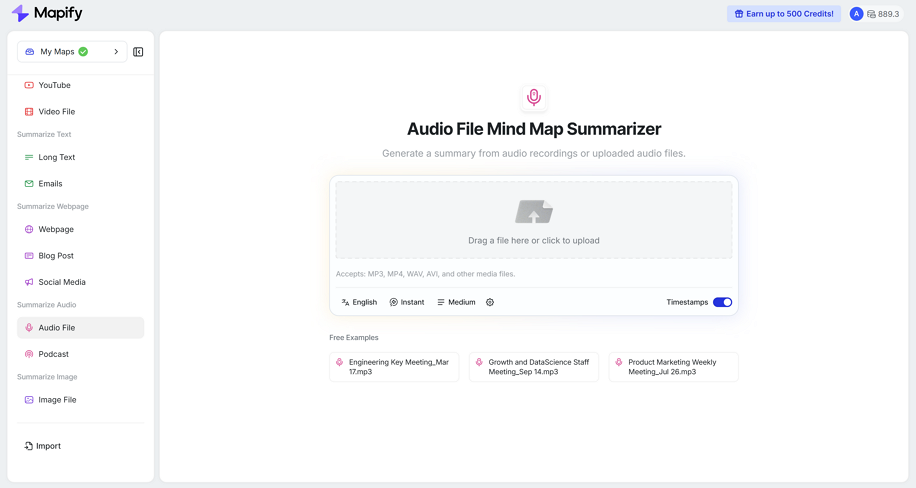
Step 1: Upload or paste your meeting transcript
Start by uploading your transcript file or pasting the full meeting text into Mapify. This can be a transcript from Zoom, Google Meet, Microsoft Teams, Otter, Tactiq, or another meeting tool. If you do not have a clean export, copied notes or transcript text can still work as long as the main discussion is included.
Step 2: Generate and refine a structured summary
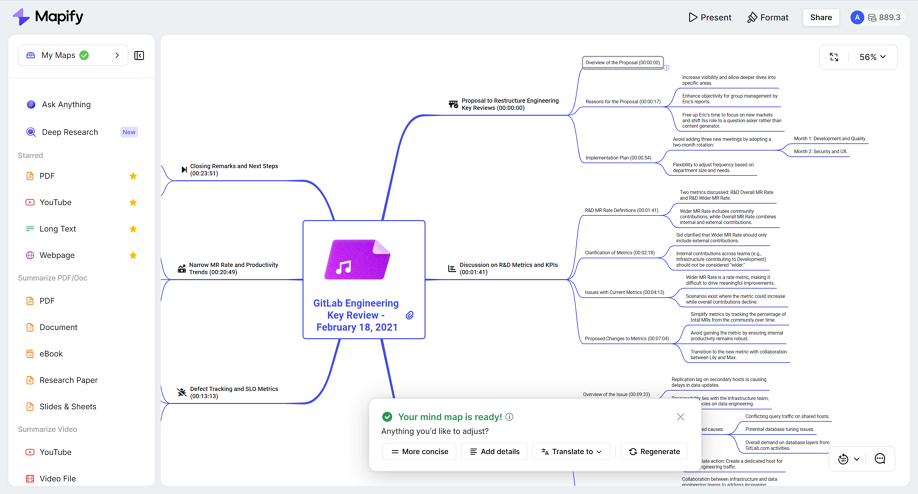
Click on the Mapify button to start summarizing the content as a visual mind map. Mapify can scan the meeting structure, understand how topics connect, and quickly spot decisions, blockers, and next steps. Refine the mind map by adjusting the structure, adding missing context, renaming branches, or reorganizing points based on your needs.
Step 3: Export and share your meeting summaries
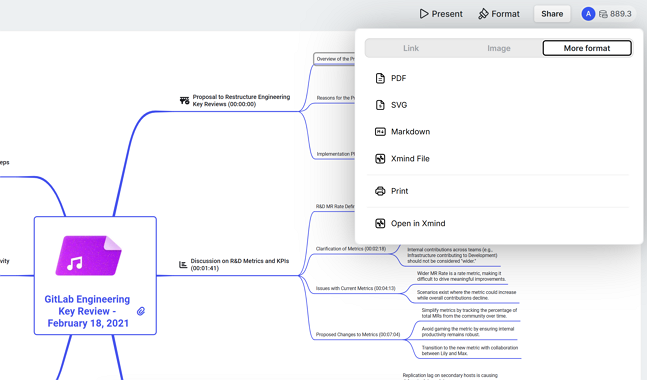
Finally, choose an output format you like. You can export the mind map as PDF, image, Markdown, Xmind, slides, etc. You can also share it with your colleagues via a link.
What Makes a Good Meeting Transcript Summary?
A useful meeting transcript summary should do more than shorten the conversation. It should help people understand the outcome of the meeting without having to reread the whole transcript.
A good summary usually includes:
- the main topics discussed
- the most important decisions
- action items and owners
- open questions or unresolved issues
- a clear structure that is easy to scan
That is why format matters. A summary is much more helpful when it is organized in a way that people can quickly understand and reuse.
When AI Meeting Transcript Summaries Are Most Useful
AI transcript summaries can be useful in many situations, especially when meetings are long, frequent, or involve multiple participants.
Team syncs: Weekly team meetings often include many small updates across different topics. AI can group them into clearer themes and action items.
Client calls: Client conversations usually contain feedback, requests, and next steps that need to be captured accurately for follow-up.
Project planning meetings: Planning sessions often generate scattered ideas and open questions. AI helps organize them into a clearer structure for execution.
Interviews and research calls: Long interviews can be difficult to review manually. AI helps surface repeated themes, key insights, and important quotes faster.
Workshops and lectures: Meeting transcript summaries can also work well for students, educators, and training sessions where spoken content needs to be turned into study-friendly notes.
Instantly turn your content into mind maps with AI
Get Started NowWhy Visual Summaries Can Be Better Than Plain Notes
A plain text summary is useful, but it still forces readers to process information line by line. When a meeting covers several topics, priorities, or decisions, plain notes can still feel dense.
A visual summary makes it easier to see:
- what the meeting was mainly about
- how discussion topics connect
- which decisions were made
- what still needs action
- where follow-up is required
This is one reason more teams are looking beyond transcript-only tools. If you are comparing different meeting summary tools, you may also want to explore our guides to the best Otter AI alternatives and best Tactiq alternatives.
Tips for Getting Better AI Transcript Summaries
AI works best when the input is clear and complete. A few small improvements can make the final summary much more useful.
Use the full transcript when possible: A full transcript usually gives AI enough context to produce a more accurate summary.
Keep the transcript clean: If possible, remove obvious noise, repeated system messages, or unrelated text before summarizing.
Focus on structure, not just shortening: The goal is not only to make the transcript shorter. It is to make it easier to understand, review, and act on.
Review before sharing: AI can save time, but a quick review still helps make sure the final summary reflects the most important priorities of the meeting.
Instantly turn your content into mind maps with AI
Get Started NowFAQ
What is the best way to summarize meeting transcripts?
The best way to summarize meeting transcripts is to use an AI tool that can extract key points, decisions, and action items automatically. If you need something easier to review and share, a visual summarization tool like Mapify can turn transcripts into structured mind maps.
Can AI summarize long meeting transcripts accurately?
Yes. AI can summarize long meeting transcripts much faster than manual review. The quality depends on the transcript itself and the tool you use. For best results, use a complete transcript and review the final summary before sharing it.
How do I turn a meeting transcript into a mind map?
You can turn a meeting transcript into a mind map by uploading or pasting the transcript into Mapify. The tool analyzes the discussion, identifies the main themes and takeaways, and generates a visual map you can edit and share.
What should a good meeting transcript summary include?
A good meeting transcript summary should include the main discussion topics, key decisions, action items, follow-up tasks, and any open questions. It should also be organized in a way that is easy to review.
Can I use Mapify for transcripts from Otter or Tactiq?
Yes. You can use meeting transcripts exported from tools like Otter, Tactiq, Zoom, Google Meet, or Microsoft Teams, then paste or upload the content into Mapify for summarization.
Why use a visual summary instead of plain meeting notes?
Visual summaries make it easier to understand the structure of a meeting at a glance. They help teams see topics, decisions, and next steps more clearly than long blocks of plain text.
Final Thoughts
Meeting transcripts contain valuable information, but raw text is rarely the best final format.
With AI, you can quickly turn long transcripts into clear summaries, extract action items, and make meetings easier to review. And if you need something easier to understand and share, visual summaries can go one step further by turning conversations into structured mind maps instead of dense text.
If your team spends too much time reviewing transcripts manually, Mapify offers a simple way to turn meeting transcripts into visual summaries you can actually use.
Instantly turn your content into mind maps with AI
Get Started Now


.png)