

Visual thinking tools help people organize ideas, but not all diagrams serve the same purpose. Concept maps and mind maps both simplify information visually, yet they differ in structure, logic, and their practical applications. Understanding these differences makes it easier to choose the right approach for learning, planning, or problem-solving.
This guide breaks down concept maps vs. mind maps, explaining how each works, what it’s best used for, and when one is more effective than the other. By comparing structure, flexibility, and real-world use cases, you can decide which visual tool fits your needs more naturally.
What Is a Mind Map?
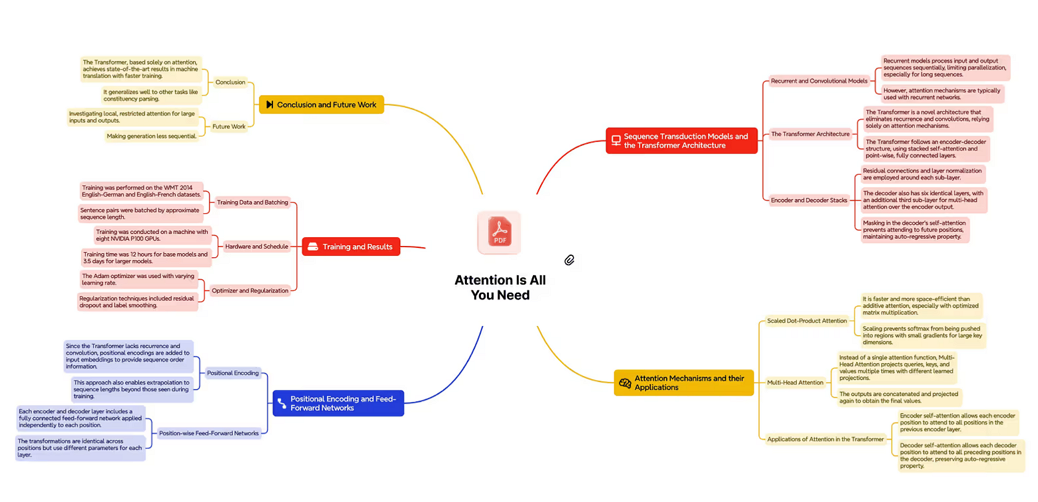
A mind map is a visual diagram that organizes ideas around a single central topic. Ideas branch outward as keywords or short phrases, expanding into related subtopics. This non-linear structure encourages creative thinking, quick recall, and flexible idea development.
In simple terms, a mind map helps you explore thoughts freely while keeping everything connected to one main focus.
General Use Cases of Mind Maps
Exam Preparation (Education)
The central topic “Exam Preparation” sits in the middle, with branches for subjects, study methods, schedule, and resources. Sub-branches include flashcards, daily targets, and textbooks.
Healthy Lifestyle (Personal Development)
“Healthy Lifestyle” branches into diet, exercise, sleep, and mental health, with details like hydration, meditation, and workout routines.
Startup Planning (Entrepreneurship)
“Startup Planning” expands into product, marketing, finance, and operations, with keywords such as pricing, funding, and team roles for quick reference.
Instantly turn your content into mind maps with AI
Get Started NowWhat Is a Concept Map?
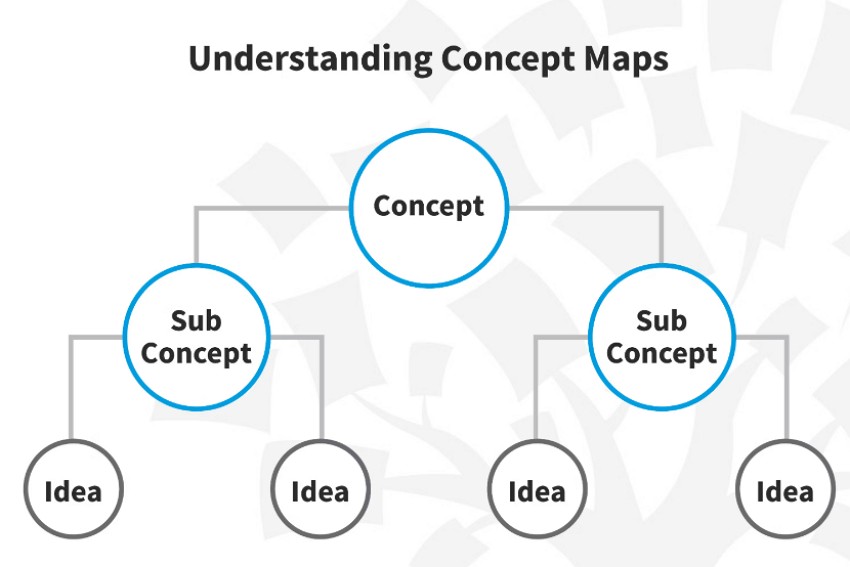
A concept map visually represents knowledge as connected concepts rather than a single central idea. Each concept appears as a labeled node, and the links between nodes explain how ideas relate to one another.
This structure helps learners focus on relationships, hierarchy, and meaning instead of memorizing isolated facts, making concept maps especially useful for complex topics.
Use Cases of Concept Maps
Photosynthesis (Biology)
Concepts like light energy, water, and carbon dioxide connect to “Photosynthesis,” with labeled links explaining processes such as oxygen production.
Economic Systems (Social Science)
Capitalism, socialism, and mixed economies connect through phrases like “is characterized by” or “leads to,” showing differences in ownership and control.
Software Development (Technology)
Planning, coding, testing, and deployment connect with cross-links showing dependencies and feedback loops.
Instantly turn your content into mind maps with AI
Get Started NowKey Differences Between Concept Maps and Mind Maps
Although both present information visually, their structure and purpose differ in important ways:
| Aspect | Mind Map | Concept Map |
|---|---|---|
| Main Focus | One central idea with expanding branches | Multiple concepts and their relationships |
| Structure | Tree-like, radial layout | Hierarchical or network-based layout |
| Connections | Usually unlabeled | Clearly labeled relationships |
| Complexity | Flexible and quick to create | More structured and detailed |
| Best Used For | Brainstorming, planning, quick notes | Learning complex systems, analysis, and teaching |
How Mapify Supports Both Concept Maps and Mind Maps
Ideas often start as scattered notes or partially understood information. Mapify brings mind mapping and concept mapping into a single, flexible workflow. Instead of choosing between creative brainstorming tools and structured diagrams, users can move naturally between both.
By converting PDFs, webpages, videos, and documents into visual maps, Mapify AI helps ideas take shape quickly. A simple mind map can later evolve into a concept map with clearer hierarchy and labeled relationships. With AI-assisted refinement, layout control, and export options, Mapify adapts to different thinking needs without forcing users to switch tools.
Instantly turn your content into mind maps with AI
Get Started NowHow to Turn Any Content into a Visual Map with AI
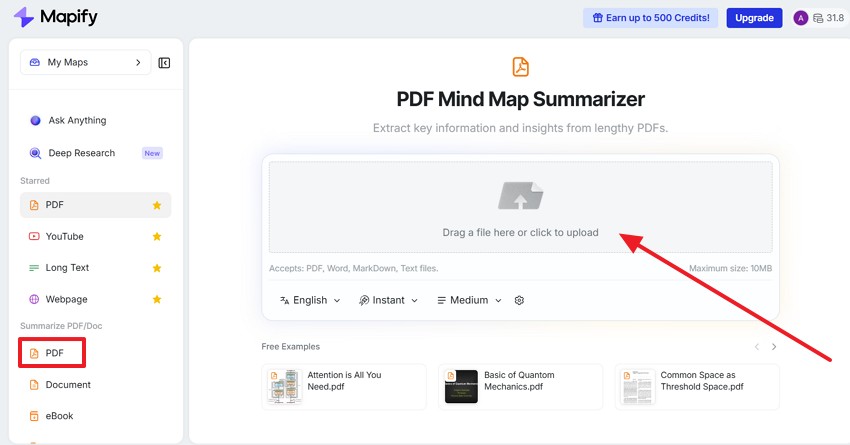
Step 1: Upload your content into Mapify
After signing in to Mapify for free, choose PDF or another supported format from the left panel. You can upload documents, paste text, or add web links.
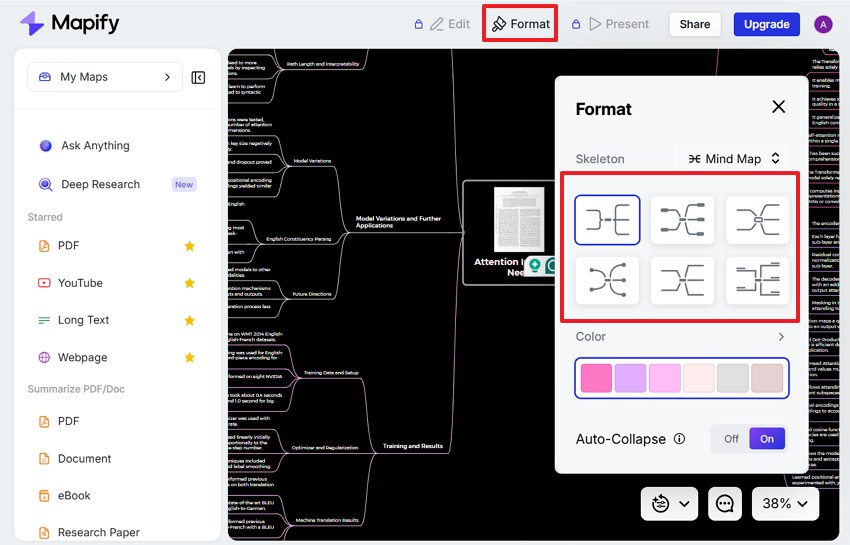
Step 2: Choose the mind map or concept map template
Once the content is processed, select your preferred visual format directly from the Format options.
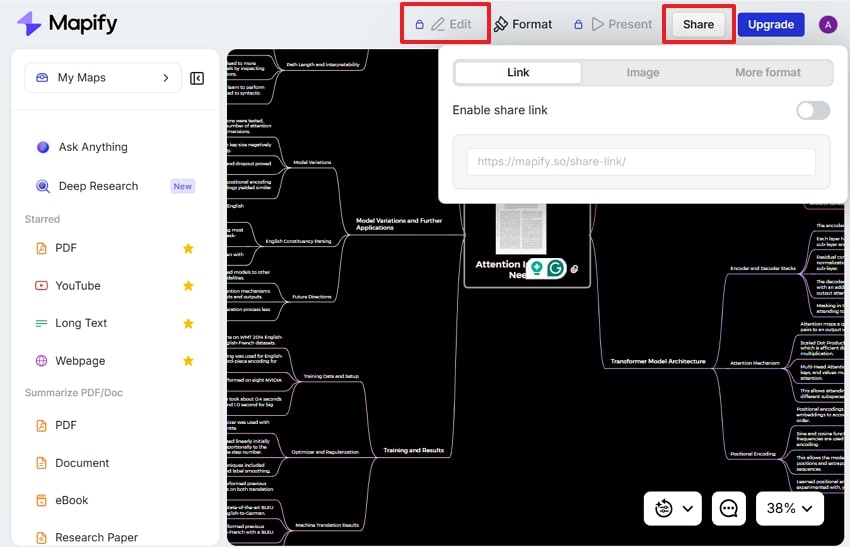
Step 3: Refine, export, and share
Refine the generated map by chatting with AI or manually editing. Then share it with others for collaboration or presentation. You can also export it as a PDF, image, markdown, or Xmind file.
FAQ
What is an idea map?
An idea map is a broad term for visual tools used to organize thoughts. Mind maps and concept maps both fall under this category.
Is an idea map the same as a mind map?
Not exactly. A mind map follows a specific central-branch structure, while “idea map” is a more general term.
What is the main difference between a concept map and a mind map?
Concept maps focus on clearly defined relationships between ideas, while mind maps focus on expanding ideas around one central topic.
When should I use a concept map?
Use a concept map when studying complex topics, teaching relationships, or analyzing systems with multiple interconnections.
When is a mind map more useful?
Mind maps work best for brainstorming, planning, and creative thinking, where flexibility matters more than structure.
Can one tool support both?
Yes. Some tools, such as Mapify, can work as both a mind map generator and a concept map maker, and switch between them as needed.
Final Thoughts
Concept maps and mind maps serve different but complementary roles in visual thinking. Mind maps support creative exploration and fast idea generation, while concept maps help explain relationships and structure complex knowledge.
For users who want flexibility without switching tools, Mapify offers a practical solution. It allows ideas to start simply and grow into more structured maps using real content like PDFs and webpages. Supporting both formats in one workflow, it fits naturally into modern learning, planning, and problem-solving.
Instantly turn your content into mind maps with AI
Get Started Now


.png)